
Search is changing fast, and Google AI Mode sits at the center of that shift. By May 2026, more than 1 billion people were using it every month, according to Google. Instead of ten blue links, you get a full answer, follow up questions and links to explore.
In this guide, you will learn what Google AI Mode is, how it differs from AI Overviews, how to use it step by step and what changed in October 2026. If you run a website, we also explain what AI Mode means for your traffic.
Quick answer: Google AI Mode is a conversational search experience inside Google Search. It uses Gemini to break your question into smaller searches, then writes one answer with links. You can open it at google.com/ai, from the AI Mode button on google.com or in the Google app.
What is Google AI Mode?
In short, AI Mode is a search mode built for complex questions. It launched in March 2025 and has grown into one of Google’s main search tools.
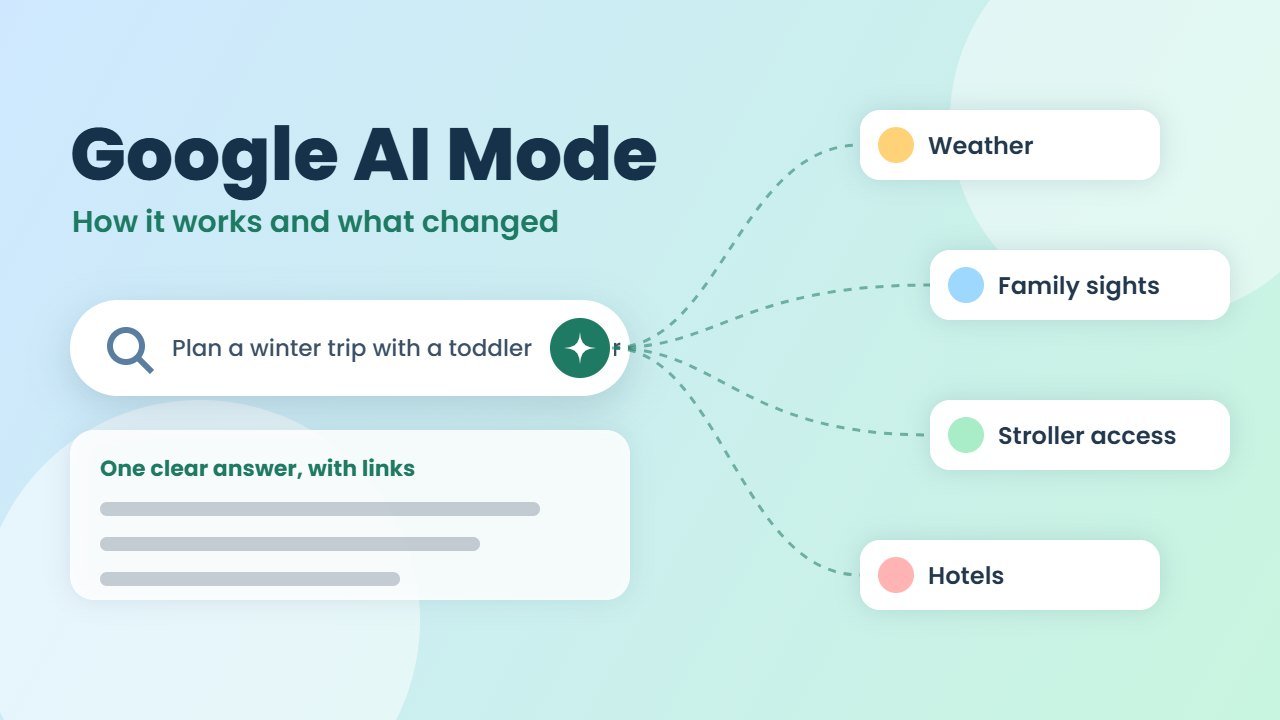
Above all, the key idea is something Google calls query fan out. When you ask a question, AI Mode splits it into subtopics and searches for all of them at the same time. Then it combines the results into one clear answer, with links to the web pages it used.
For example, ask “Plan a three day winter trip to Lisbon for a family with a toddler.” AI Mode covers weather, family friendly sights and hotels in one go.
Google AI Mode vs AI Overviews
Here is the difference:
| AI Overviews | Google AI Mode | |
|---|---|---|
| Where it appears | At the top of normal results | In its own tab or page |
| Best for | Quick summaries | Complex, multi step questions |
| Follow up questions | Limited | Yes, like a chat |
| Input types | Text | Text, voice, images, files and more |
In short, AI Overviews give you a fast summary. AI Mode is a full conversation. In fact, you can now ask a follow up from an AI Overview and continue the chat in AI Mode.
Which model powers it?
Since May 2026, Gemini 3.5 Flash is the default model in AI Mode worldwide. In addition, Google AI Pro and Ultra subscribers can choose Gemini 4 Argon, Google’s newest model, inside AI Mode. You can read more about that model in our guide to Gemini 4 Argon.
How to use Google AI Mode
Here is how to start:
- Go to google.com/ai, or tap AI Mode in the search bar on google.com.
- On your phone, open the Google app and tap AI Mode.
- Type your full question. Long, detailed questions work best.
- Read the answer and tap the links to visit the sources.
- Ask a follow up question to go deeper.
- To go back to normal results, tap All.
According to Google’s AI Mode help page, you can also ask with your voice, upload an image through Google Lens, or add a PDF or a web address. Google’s new “intelligent Search box” even accepts files, videos and open Chrome tabs.
Best features to try
Search Live
First, Search Live lets you talk to AI Mode out loud and share your camera. For example, point your phone at a broken tap or a plant, ask what is wrong, and get answers in real time. It works in the Google app on Android and iOS wherever AI Mode is available.
Multimodal search
Also, you can mix text and images in one question. For example, snap a photo of a jacket and ask where to buy something similar under a set budget.
Agentic booking
In the US, AI Mode is rolling out agentic booking for local services. In other words, it can find options and help you complete a booking.
Universal Cart
On 15 October 2026, Google launched Universal Cart in the US. It works in Search, including AI Mode, and in the Gemini app. Moreover, it tracks price drops, shows promo codes and lets you check out with Google Pay, while the store stays the seller.
What changed in Google AI Mode in October 2026?
On 15 October, the company announced five changes to links in AI Mode and AI Overviews, as described in its official blog post:
- More inline links, higher up. Links to websites now appear more often and earlier in answers.
- An official pages section (test). For tasks that only one or two official sites can complete, Google is testing a section at the top.
- Article carousels in more countries. Rows of recent news articles are expanding to more locations and languages.
- Better related article links. These now show thumbnails.
- Clickable creator profiles (test). Video results can show who made them.
Google also said use of Preferred Sources has grown more than seven times since the start of the year. If readers pick a site as a preferred source, its articles get more visibility, including in AI Mode.
Is it free, and where is it available?
Basic AI Mode is part of Google Search, so you can use it without paying. Only some extras, such as choosing Gemini 4 Argon, need a Google AI Pro or Ultra plan.
As for reach, The company says AI Mode and Search Live are available in more than 200 countries and territories. However, some features, such as Universal Cart and agentic booking, are US only for now.
Can you turn it off?
In fact, there is no official off switch. Still, AI Mode does not take over your normal search. Instead, just use the regular search box and stay on the All tab. Some people also use the Web filter to see plain links only.
What Google AI Mode means for website owners
If you run a blog or business site, AI Mode is now a real source of visitors. Specifically, Search Console counts AI Mode clicks and impressions inside the main Performance report in Search Console. In addition, a newer Generative AI report shows impressions from AI Overviews and AI Mode, although sites with little traffic may not see it yet.
To earn links in AI Mode, focus on the basics:
- Answer real questions clearly, with original insight.
- Use simple headings that match how people ask.
- Show who wrote the content and why they can be trusted.
- Ask loyal readers to add your site as a preferred source.
For more on writing content that both people and Google value, see our guide on how to tell if text is AI generated.
Frequently asked questions
What is the difference between AI Mode and AI Overviews?
AI Overviews show a quick summary at the top of normal results. AI Mode is a separate, chat style search for complex questions with follow ups.
Is Google AI Mode free?
Yes, basic AI Mode is free in Google Search. Choosing Gemini 4 Argon inside it needs a Google AI Pro or Ultra plan.
Which Gemini model does AI Mode use?
Gemini 3.5 Flash is the default worldwide. Pro and Ultra subscribers can also pick Gemini 4 Argon.
Does AI Mode traffic show in Search Console?
Yes. Search Console counts AI Mode clicks and impressions in the main Performance report, and a Generative AI report shows impressions too.